Tasks Hub (tasks)
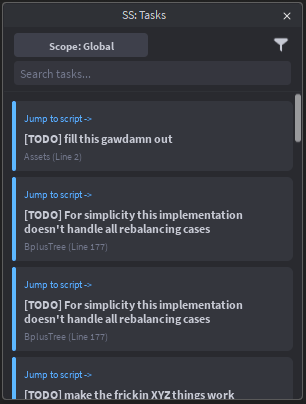
tasks displays all TODO, FIXME, HACK, and NOTE comments in an interactive Tasks widget.
Screenshot placeholder: the Tasks widget UI
Usage
taskstasks local/tasks currenttasks global/tasks all
Aliases
todoboard
What it shows
The Tasks widget lists task items with:
- A tag (TODO/FIXME/HACK/NOTE)
- The message text
- Script name + line number
- A Jump To button that opens the script at that line
Screenshot placeholder: a task card showing tag + message +
(Line X)and the Jump button.

Scopes (Local vs Global)
The widget supports two scopes:
Global
Shows tasks across the full project.
Local
Shows tasks only for the currently active script (StudioService.ActiveScript).
You can switch scope in two ways:
- Command args:
tasks local/tasks currenttasks global/tasks all
- UI: click the Scope button to toggle Global ↔ Local.
Filters and search
Tag filters
The widget includes a filter dropdown with toggles for:
- TODO
- FIXME
- HACK
- NOTE
Search
Typing in the search box filters tasks by:
- message text
- script name
Screenshot placeholder: filter dropdown open (showing TODO/FIXME/HACK/NOTE toggles).

What gets scanned
ScriptSense builds the list by calling TaskScanner:GetAllTasks() each time you run tasks (so the board refreshes when opened).
Example comment style:
-- TODO: refactor this
-- FIXME: handle nil case
-- HACK: temporary workaround
-- NOTE: optional reminder
Terminal output
When opened/refreshed, ScriptSense logs:
- “Task board refreshed (Local Script)” or
- “Task board refreshed (Full Project)”
Troubleshooting
“Local is empty but I see TODOs”
Local mode only shows tasks for the active script. Open the script that contains the TODOs, then run tasks local.
“Jump To doesn’t open the right spot”
Jump uses plugin:OpenScript(script, line). If line numbers are off, it usually means the file changed since tasks were scanned—re-run tasks to refresh.