Generate Docs (gendocs)
gendocs generates a Markdown-style API reference for a ModuleScript and writes it into a new ModuleScript next to the target.
It supports two documentation modes:
- Proxy (TypeDef) mode (if your module contains a
TypeDeforTypeschild script) - Inline (Source) mode (parses function declarations + preceding
--comments)
Usage
Command: gendocs (Name)
- If
(Name)is provided, ScriptSense tries to find a matching module by name. - If
(Name)is omitted, it tries:- the ActiveScript
- otherwise, your current Selection (first item)
gendocs only works on ModuleScripts. If the target isn’t a ModuleScript, it logs an error.
Output
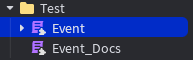
gendocs creates a ModuleScript named:
<TargetModuleName>_Docs
It is created in the same parent as your target module, and ScriptSense opens it automatically.
If <TargetModuleName>_Docs already exists, gendocs overwrites its contents.
The generated content is Markdown-like text wrapped inside a Lua block comment so it’s readable in Studio.
Mode 1: Proxy (TypeDef) Mode
If your module has a child named TypeDef or Types (and it’s a LuaSourceContainer), gendocs parses that child’s .Source instead of the module’s source.
This mode expects a structure like:
- Entries that look like:
MethodName: typeof(...) - A
--[[ ... ]]block comment near the method for the description - A
function(self:SomeType, ...)signature inside the typeof block
Notes:
- The
self:Typeparameter is removed from the generated signature for readability. - Simple HTML-like tags in TypeDef comments are converted:
<strong>→**bold**<em>→*italic*<code>→`inline code`
Mode 2: Inline (Source) Mode
If no TypeDef / Types child exists, gendocs scans the module source for function definitions like:
function module.Name(...)function module:Name(...)
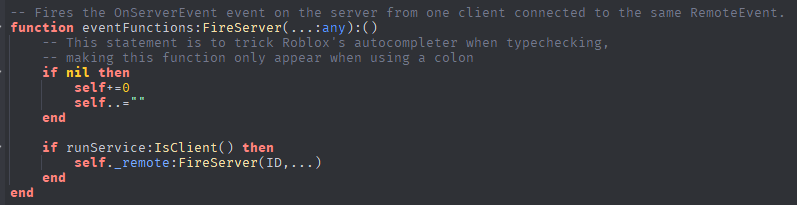
It then looks upwards for contiguous -- comments directly above the function and uses those as the description.
Rules:
- It stops collecting comments when it hits a line containing
---. - If no description is found, it outputs:
No description provided.
Recommended inline doc style
Put -- comments directly above the function:
-- Returns the player’s cached data.
-- If the player has no cache entry, returns nil.
function DataService:Get(player: Player)
	...
end
Example workflow
- Select or open a ModuleScript (e.g.
DataService) - Run:
gendocs
- A new module appears next to it:
DataService_Docs
Troubleshooting
“Error: select a ModuleScript.”
Your target wasn’t a ModuleScript. Select/open a ModuleScript and run again.
“No documented functions found.”
Either:
- your Inline functions don’t match the patterns
gendocssearches for, or - there are no TypeDef entries/comments it can parse.